
REDACTOR
ESCAPE
REDACTOR ESCAPE is a FiveM pause menu designed not to distract you from the game, but to enhance your roleplay experience within it.
When you press ESC, a clean interface opens up. No clutter—just the essentials you need right now.
01 / Your character, at a glance
How does this
FiveM pause menu work?
You’ve stopped in the middle of a Los Santos street.
Your car is idling at a traffic light... pedestrians are walking by.
And right in front of you—your profile.
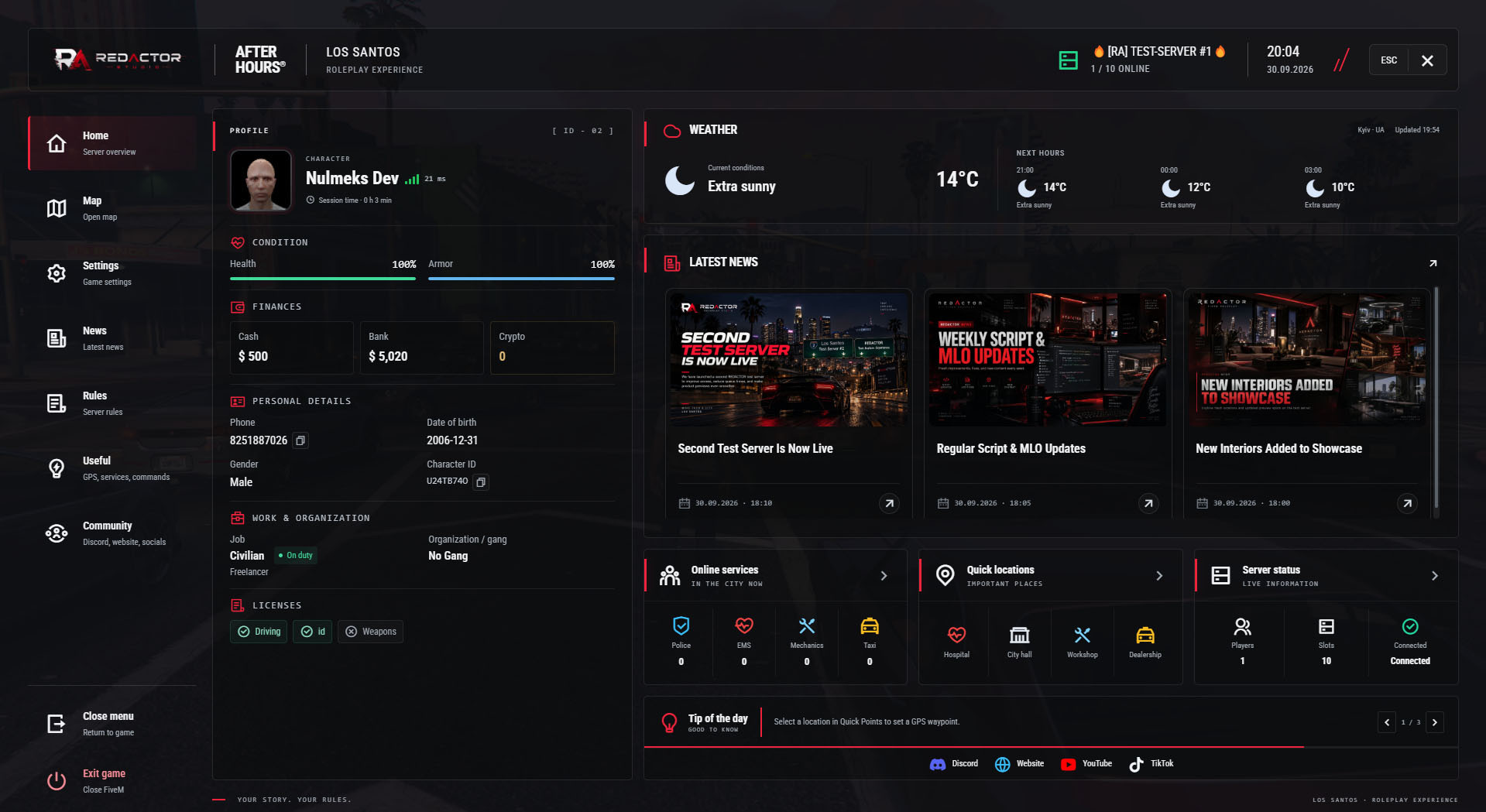
Everything is visible at a glance:
- Character name,
- Health/armor (bars),
- Current funds,
- Your job and current duty status...
Nothing complicated. Just straightforward, honest data about your character.
02 / Server news, services & GPS
What else
can you do?
🔹 Check city news:
Did the mayor announce a new event? Is the police warning about a chase?
Quick to read—short headlines plus the publication date.
🔹 See who’s online:
Need help or need to coordinate on duty? See service counts at a glance, based on your server’s job and duty settings.
Example service counts
Police
3
EMS
1
🔹 Select a GPS location:
Want to go to the hospital? The car market? City Hall?
Pick a destination → a GPS waypoint is set automatically...
And a second later, you close the menu!
03 / Just the essentials
Unpretentious
design
The layout is simple yet pleasing to the eye:
The color scheme matches the server's style (e.g., red and black).
The REDACTOR logo sits in the top-left corner...
The background is semi-transparent—the city continues right behind the menu!
It doesn't get in the way of gameplay...
it makes it more convenient.
And all of this without unnecessary flair. No flashy light animations, explosions, or multimedia effects. It’s simply information, neatly organized into an interface that looks just like a real city control panel.
04 / Keep your server within reach
Server rules, community links
& weather
🔹 Server Rules
Open the section and instantly see all the key points:
— prohibited actions (e.g., cheating),
— roleplay rules (how to behave during an arrest),
— faction-specific details...
You can search by keyword right here. It’s convenient for newcomers and players returning after a long break.
🔹 Community links
There’s a dedicated tab for important resources:
- Link to the Discord chat,
- Official server website,
- YouTube/TikTok channels...
One click → open your community’s website or social page!
🔹 Time & weather
See the current time ("21:47") and the weather outside ("Rain," +15°C)...
Time
21:47
Weather
Rain +15°C
Weather and temperature appear when supplied by a supported REDACTOR weather resource.
05 / Make it your server
Your menu.
Your configuration.
Four Lua files for branding, player details, services, GPS points and your server’s own content.
// CONFIGURATION
04 LUA FILES / RAPause.Config / SELECTED FIELDS
Edit these fields inside the named sections; these are not replacement configs.
01 / config.lua
Menu, branding, profile, visible sections, services, GPS, community links and tips.
Menu
command = 'rapause', key = 'ESCAPE', exitGame = true,Branding
name = 'REDACTOR', city = 'LOS SANTOS', accent = '#ef233c',Branding
logo = 'assets/img/logo.svg',PlayerCard
avatar = true, showHealth = true, showArmor = true, showLicenses = true,PlayerCard.extraCurrency
account = '', label = '', symbol = '', symbolAfter = false,Display
currency = '$', timeFormat = '24', weather = true,Sections
news = true, services = true, locations = true,Services[1]
jobs = {'police','sheriff'}, dutyOnly = true, unknownDutyCounts = true,Locations[1]
coords = vector3(298.2, -584.7, 43.3), service = 'ems',Community[2]
label = '@website', url = 'https://www.redactor.studio',NewsDisplay
previewCount = 3, showCover = true, showDescription = true,TipRotation
intervalSeconds = 4, manual = true, pauseOnHover = true,Tips entry
'Read the server rules before you start playing.',02 / config_news.lua
Headlines, full text, covers and publication labels. The last entry appears first.
{ title = 'Example News #1', description = 'This is what your text could look like here..', cover = '', date = '24.09.2026', time = '17:00' },03 / config_rules.lua
Your rule titles, full text and reading order.
{ title = 'Example #1', description = 'This is what your text could look like here..' },04 / config_useful.lua
Your guides, full text and reading order.
{ title = 'Example #1', description = 'This is what your text could look like here..' },// APPLY Edit → restart ra_pause_menu_ah. No UI rebuild for config edits.
// DATA ra_core supplies player/service data and the interface language. Weather requires ra_environmental_control or ra_easy_time; without data, the weather block is hidden.
// GPS Locations set waypoints, not teleports.
06 / Back to the game
How do you
close the menu?
Just press "ESC" again... or click the close button.
The menu closes—and you’re right back in the game!
No clutter.
No unnecessary steps.
Just the essentials—then straight back to your game.
Optimized scripts
Clean, optimized scripts tested in-game for reliable performance and easy setup. Check each resource for framework support, dependencies and installation details.
Tested GTA V game builds: 3095, 3258, 3407, 3570, 3751, 3889.
Resource localizations
Resource UI text is prepared for all supported store languages, so players can use products in their preferred locale where the resource includes translation files.
Delivery & support
Automatic Tebex delivery, documentation and Discord support are included with every purchase.
For installation help, include the resource name, your framework and the error message or steps that reproduce the issue. For access questions, include your order details.